
How to disable CloudFlare IPv6 access
If you want to disable IPv6, you are probably running a project with some old code that is not able to process IPv6 REMOTE_ADDR in PHP. I assume you do not use CF API at all, so the fastest option will be to use the global API key to disable IPv6 and then generate a new global API key.
Copy your CF account global API key from the CF user panel: https://dash.cloudflare.com/profile/api-tokens
Copy your domain Zone ID:
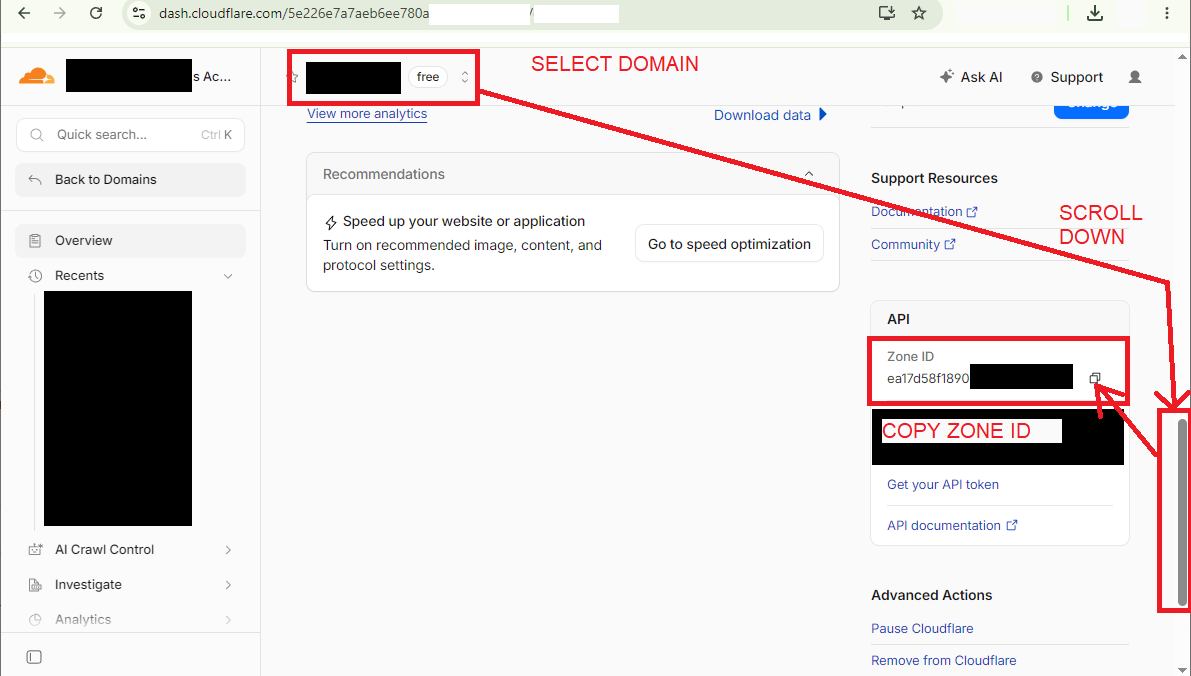
Execute in terminal with curl installed (ex. Linux) or Postman:
curl -X PATCH "https://api.cloudflare.com/client/v4/zones/YOUR-ZONE-ID/settings/ipv6" \
-H "X-Auth-Email: YOUR@EMAIL.COM" \
-H "X-Auth-Key: YOUR-GLOBAL-API-KEY" \
-H "Content-Type: application/json" \
--data '{"value":"off"}'
with your domain ZONE ID, CF ACCOUNT E-MAIL and GLOBAL API KEY.
In CF domain panel "Network", it will still show that IPv6 Compatibility is enabled. You have to refresh the site (F5) to make it load updated Network settings.
If you execute this curl line on your Linux server without space as start of line, your CF global API key will be stored in Linux command line history. Generate a new global API key in CF panel, it will disable an old API key.